Technology classes for senior living communities
Help residents feel more
at home with technology.
Engaging technology classes for senior living communities, created to build confidence, encourage questions, and support everyday independence.
Bring meaningful learning to your activity calendar with 3 to 5 fresh recorded classes each month. Every class comes with permission to watch together, a printable resident guide, and a flyer to help you invite residents.
Prepared classes. Practical materials. A welcoming place to begin.
The Cover Guide approach
Confidence begins with feeling understood.
Having a question and feeling comfortable asking it are two different things.
Someone may want to connect with family, simplify their phone, or understand an unfamiliar message. Before they ask for help, they need to feel that their question will be met with patience and respect.
Cover Guide makes room for that first step. Stories, humor, and clear explanations create an enjoyable experience where curiosity is welcome and each lesson has a purpose.
See what the experience feels like.
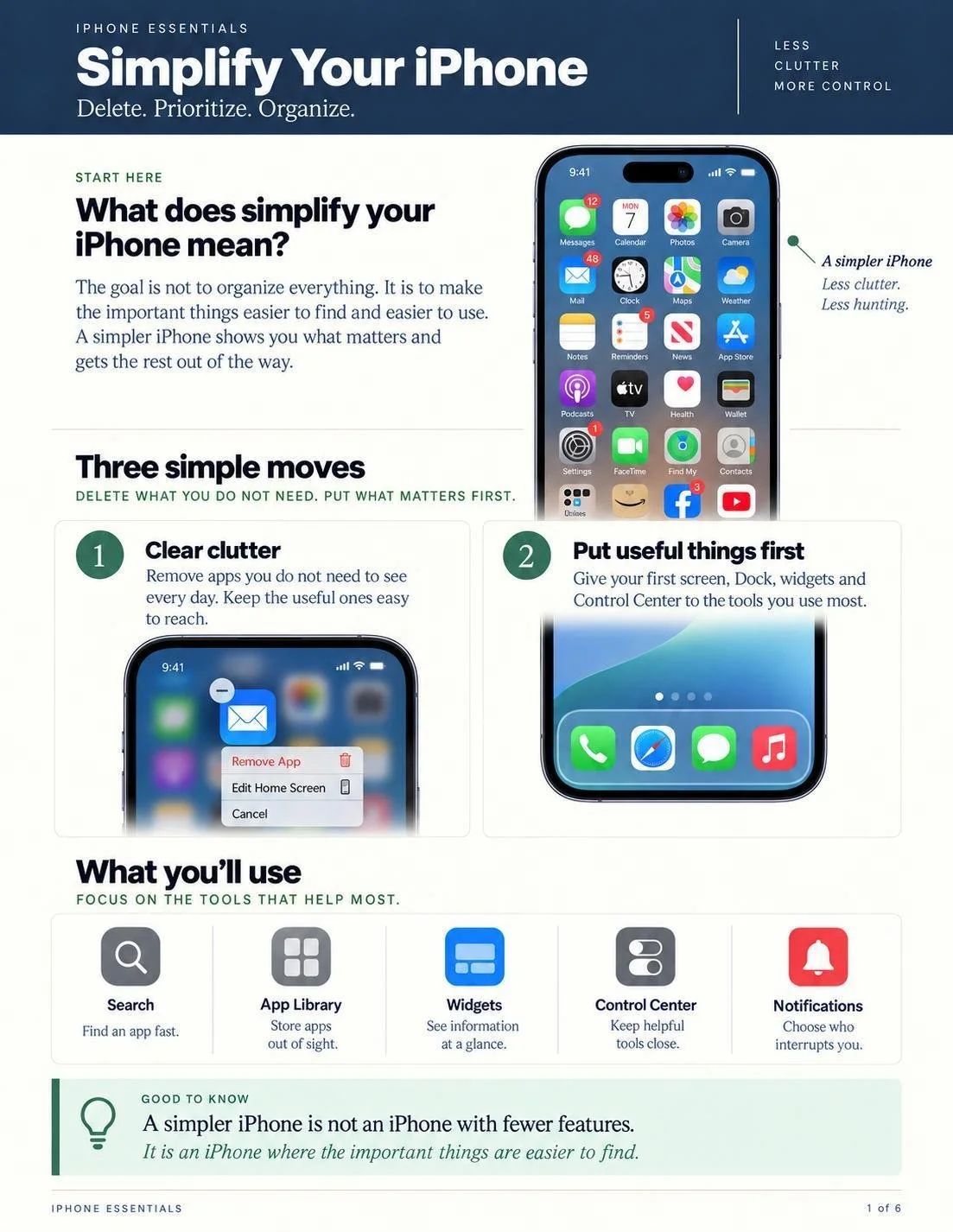
Simplify Your iPhone
Delete. Prioritize. Organize.
Watch a few minutes to get a feel for the teaching, pace, and personality. The full sample class is available here, with no registration required.
Use the player’s controls for full screen viewing and captions to adjust your viewing experience.
Watch on YouTube (opens a new tab)The sample class companion
Learning residents
can return to.
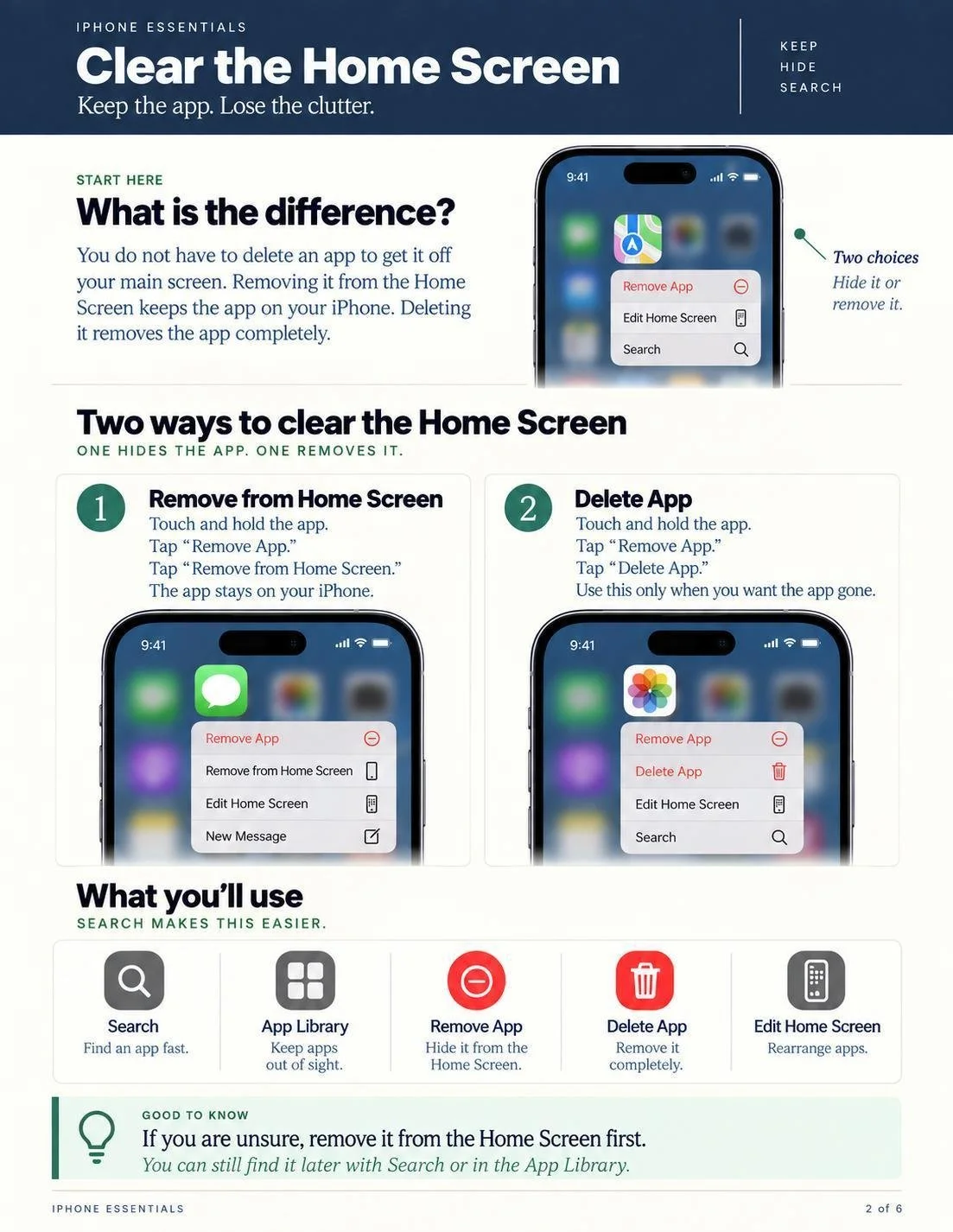
The companion guide gives residents a way to revisit the lesson and practice when they feel ready.
Explore six illustrated pages from Simplify Your iPhone, including practical steps for clearing the Home Screen and keeping useful tools close.
PDF · 6 pages · Free to download and print
Your community license
Ready for your calendar.
Useful beyond the class.
3 to 5 fresh classes each month
Recorded technology classes your team can schedule for residents to watch together.
A resident guide for every class
Downloadable, printable materials to support practice and help residents revisit what they learned.
A flyer for every class
Prepared publicity for your newsletter, email, or bulletin board.
Choose a time. Invite residents.
Play the class. Share the guide.
Your team brings people together. We prepare the teaching and materials.
A partner to your local support
Make the most of the support you already provide.
Local expertise and personal assistance matter.
Cover Guide can give residents a shared starting point: a useful idea, clearer language for a question, or the confidence to ask for help.
That creates a natural connection between your activity programming and the people residents turn to for individual support.
Have a particular training need or a question about live Q&A? We welcome a conversation about the approach that would serve your community.
Everyday skills
Personally meaningful possibilities.
Small discoveries can make familiar routines feel easier.

- Stay close through FaceTime.
- Send a message with confidence.
- Recognize a suspicious text.
- Choose your privacy settings.
- Find the apps you need.
- Quiet unwanted notifications.
- Connect to Wi-Fi.
- Keep favorite photos within reach.
Value across your community
A thoughtful investment
in everyday independence.
For residents
Opportunities to learn, make informed choices, and keep doing the things that matter to them.
For your staff
Prepared programming and materials, with a clearer starting point for conversations about technology.
For loved ones
A visible commitment to helping residents stay connected and feel supported.
For your community
A regular place for practical learning, including conversations about privacy, suspicious messages, and when to seek trusted help.

Meet Royal Knox, founder of Cover Guide
Experience that
puts people at ease.
Royal has spent decades helping thousands of people make sense of technology through business presentations, community workshops, and individual instruction. His experience includes nearly a decade at Apple.
Teaching in senior living communities has given that experience a clear purpose: help people feel respected, understand what matters, and feel ready to try.
That approach shapes Cover Guide. Begin with connection. Explain with care. Leave people with something they can use.
“A shared laugh opens the door. Trust makes room for honest questions and learning that lasts.”Royal Knox, Founder of Cover Guide
Let’s talk about your community
What would greater technology confidence make possible in your community?
Tell us what residents are asking, what your staff are navigating, and what you would like to make easier.
We can talk through the class package, how it could fit your calendar, and any specific training or support ideas you would like to explore.
Email we@cover.guide with your community name and a question, or suggest a time for a phone call.
A useful conversation starts with understanding your community.